
Over the past few days, Google quietly rolled out a new experimental feature: AI-powered configuration inside Search Console. In short – you can now type what data you want to see and let search-engine AI build the report for you automatically. This simpler, faster way to filter, compare, and analyze performance could be a game-changer for SEOs and marketers.
But here’s an interesting twist: a similar AI-powered reporting assistant already exists in Google Analytics 4 (GA4), under the name Analytics Advisor (Beta). Many users, including me, have noticed it – yet nobody seems to be talking about it. Let’s dive into both, and why this matters if you care about SEO, analytics, or just saving time.
What Is AI-Powered Configuration in Search Console?
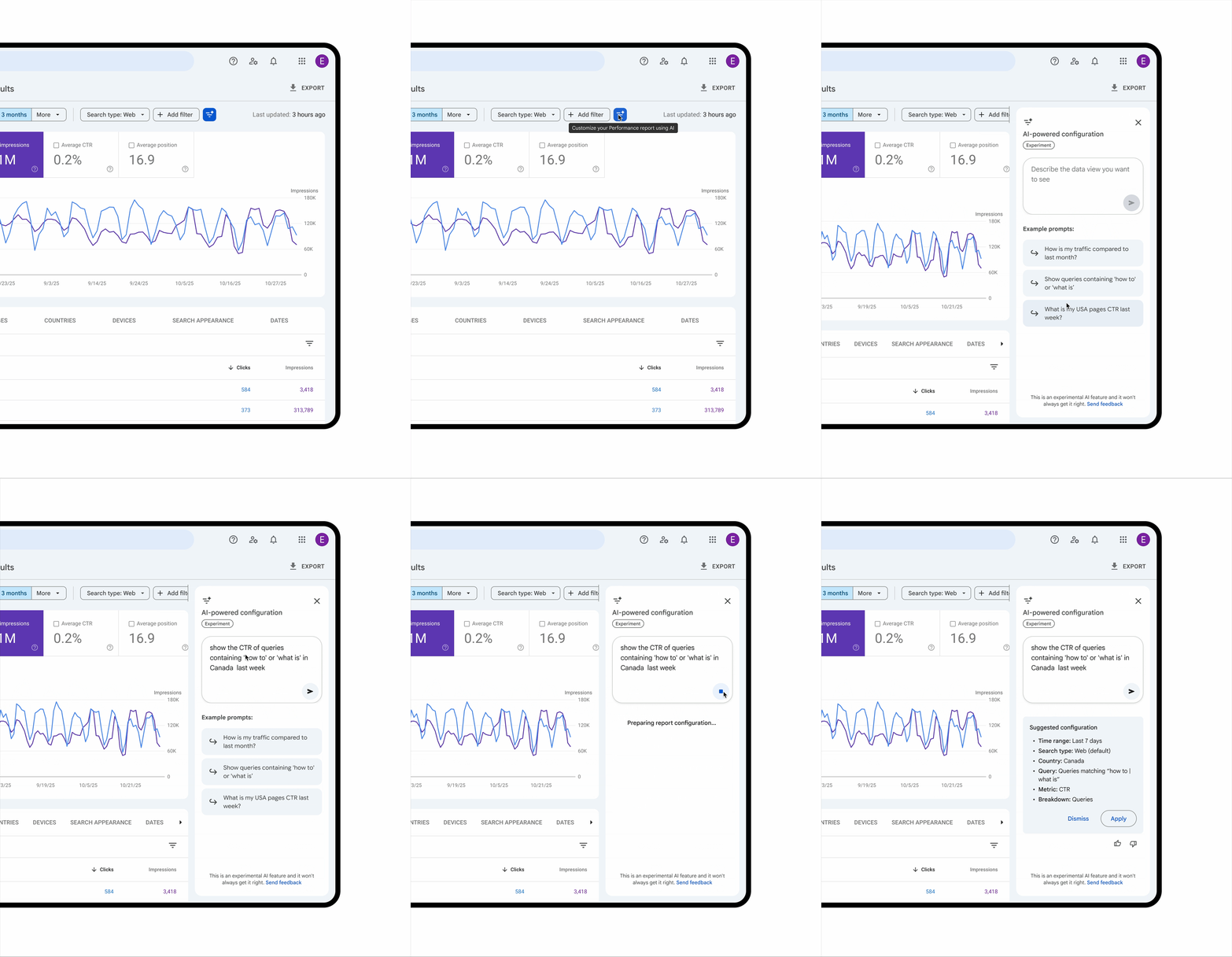
Video Credit – Google Search Central Blog
- Natural-language filtering: Instead of manually selecting dozens of filters (query, page, country, device, date range), you just describe what you want (for example, “show me clicks and impressions for mobile devices in India for last 30 days”) — and GSC builds the report instantly.
- Flexible comparisons & reports: You can ask to compare periods, see breakdowns by device or search type, or slice traffic by pages – no manual setup needed.
- Faster insights: For marketers, SEOs, or site owners, this reduces time spent configuring reports – making frequent and detailed audits easier than before.
Since the release is very recent, it’s being “rolled out slowly.” Not everyone may see it – I don’t yet see it on my Search Console property. It’s plausible the feature will reach more accounts soon. Search Engine Land
Analytics Advisor in GA4 — The Silent Precursor
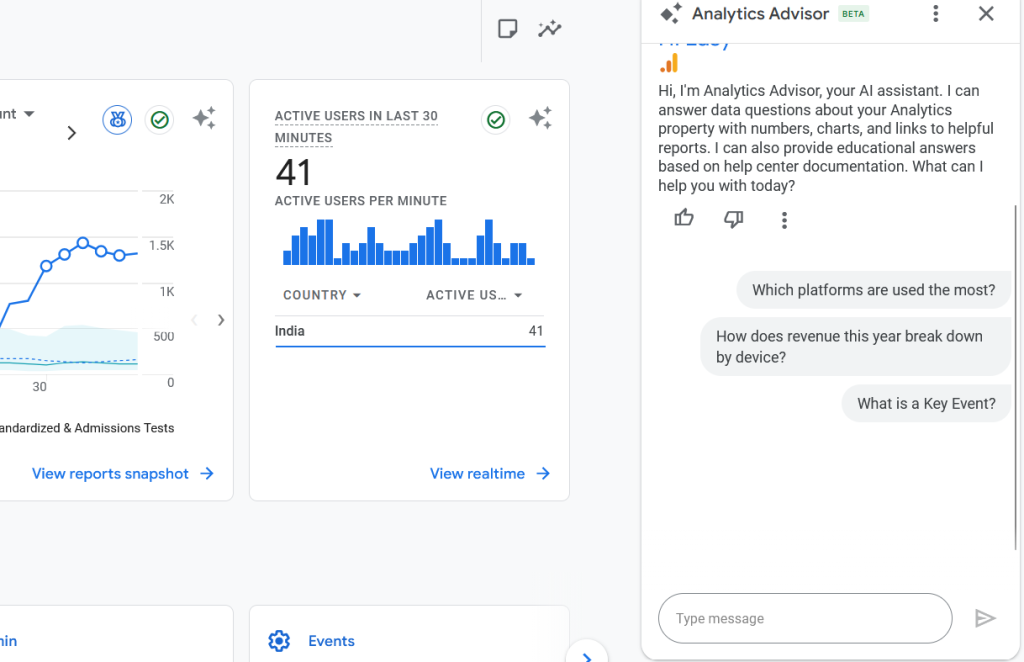
Interestingly, Google already offers a similar AI-driven tool inside GA4 — Analytics Advisor (Beta). This tool lets users ask questions about their analytics data in plain language and get back actionable insights such as trend summaries, anomaly detection, or quick charts.
- Accessible via GA4 interface: If your property is eligible (English language, new interface), you may see a small icon or prompt to “Ask Analytics Advisor.”
- Real-time, property-level analysis: Unlike regular static reports, the Advisor processes data in real-time and helps you spot insights fast: traffic dips, channel performance, unusual spikes, etc.
- Currently limited rollout: Not all GA4 properties get it yet – I see it on my selected property, but many colleagues don’t. This limited availability explains why there’s little buzz. Google Help
Given that both features use similar AI paradigms (natural-language input, automated configuration, faster insights), it’s natural to expect that Search Console’s AI configuration will roll out gradually – just as GA4’s Advisor did.
Why This Matters — For SEOs, Marketers, and Site Owners
- Huge Time Savings – No more clicking through layers of filters or building complex comparisons manually. With AI configuration, you get instant reports just by describing what you want.
- More Frequent & Intelligent Insights – You can run quick “spot checks” — compare device traffic, filter by search appearance (e.g. mobile vs desktop), track performance over custom date ranges – anything, without manual effort.
- Better Adoption of Data-Driven SEO – Less friction in getting data means more likely to check performance often. For small teams or solo SEOs, this lowers the barrier to deeper analytics.
- Early Advantage for Early Adopters – As the feature rolls out gradually, users who get access first can capitalize on smarter analysis – especially useful in competitive niches.
My Take: What I Expect from the Rollout
Based on what I see in GA4 and early announcements for GSC:
- The AI configuration feature in Search Console is still in beta / rolling out slowly.
- It will likely expand gradually, first to English-language accounts or random properties, before a broader rollout.
- Once widely available, it could become a standard tool for SEOs – similar to how GA4’s Advisor gained adoption quietly.
- This shift could encourage a new generation of SEO professionals to rely on AI-driven analytics + quick insights, rather than only manual reports.
In short: this is not just a small update – it’s a signal that even analytics tools are evolving into AI-assisted productivity tools.
What You Should Do Right Now
- Keep checking your Search Console account – the AI-powered configuration might appear soon.
- If you have GA4 access, play with Analytics Advisor – get comfortable with natural-language analytics, and observe which insights are most valuable.
- Use both tools to form a habit – regular insights, frequent audits, intelligent reports.
- For content owners / SEOs – make use of AI-driven insights to spot trends, issues, or opportunities faster than before.
Final Thoughts
Google’s AI-powered configuration in Search Console signals a shift: analytics and SEO tools are no longer just dashboards and filters. They’re becoming smart assistants that understand natural language and generate insights in seconds.
If you like me value quick, data-driven decision making, this change could make your life easier and your SEO strategy more responsive.
And if you’re reading this after the rollout has completed, congratulations: you now have early access to what could be the future standard for search analytics.
Read More on Google Search Central Blog

Kira Cube
Kira Cube, founder of Kira Diverse, brings over eight years of SEO expertise across on-page, technical SEO, CRO, local optimization, e-commerce growth, and content refinement. His approach blends data, experience, and AI-ready strategies that help brands grow with clarity and long-term impact.